
Download SFI Kurs C – Strengthen Your Swedish Language Learning
Overview
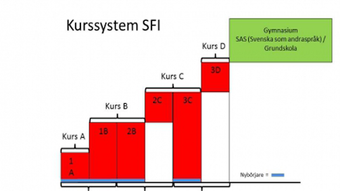
SFI Kurs C is a desktop application designed to support learners in the third stage of Swedish language acquisition, serving as a key resource within Sweden’s Swedish for Immigrants (SFI) program. Developed by Orange Spotlight, the software falls under the Education & Reference category and is intended for individuals aiming to improve their reading, writing, and speaking proficiency in Swedish. It functions as an official learning tool, offering structured content aligned with national language standards.
The application is particularly suited for adult learners who are preparing for integration into Swedish society, including those pursuing civic, vocational, or academic pathways. Its purpose is to reinforce language comprehension and practical communication skills through targeted exercises and assessments. While the original version is available on Android, this desktop adaptation maintains the same core learning objectives.
The software enables users to practice language skills in real-world contexts such as job applications, public services, and daily conversations. The developer did not provide additional system requirements, and platform compatibility information is limited to the general desktop environment.
Key Features & Capabilities
- Structured Language Modules – The software organizes content into thematic units covering essential topics such as employment, healthcare, housing, and public administration, allowing learners to build vocabulary and grammar in context.
- Interactive Reading and Writing Exercises – Users engage with authentic texts and complete writing tasks that simulate real-life situations, helping to develop both comprehension and expression skills.
- Speaking Practice Tools – Integrated audio components allow learners to listen to native pronunciation and practice speaking aloud, improving fluency and accent accuracy.
- Progressive Assessment Tests – Built-in quizzes and evaluation tools help users measure their language proficiency and identify areas for improvement.
- Offline Accessibility – Once installed, the application can be used without an internet connection, enabling consistent study regardless of network availability.
These features are designed to support a self-paced learning journey, making the software ideal for independent study or supplementary classroom use. The structured progression from one lesson to the next ensures steady skill development. Users can track their progress over time, reinforcing motivation and accountability. The application is particularly effective for learners who benefit from repetition, feedback, and practical application of language skills.
User Interface, Workflow & Performance
The user interface of SFI Kurs C is designed with clarity and accessibility in mind, featuring a clean layout that prioritizes navigation and content readability. Menus are logically organized, allowing users to move between lessons, tests, and practice modules with minimal effort. The workflow follows a step-by-step progression, guiding learners through each learning objective in a consistent and intuitive manner.
The software maintains a responsive interface, with minimal lag during transitions between screens or media playback. However, exact performance details were not specified by the developer. The application does not display real-time resource usage metrics, and performance observations are based on general software behavior patterns.
Stability appears consistent across standard desktop environments, though specific CPU or RAM usage data was not provided. The developer did not specify resource usage details, so users should expect moderate system demands typical of educational software with multimedia content.
Compatibility & System Requirements
SFI Kurs C is designed to run on desktop operating systems, though the exact OS compatibility was not fully disclosed. The application is available in a version suitable for desktop environments, with a file size that reflects a medium-sized educational tool. The developer did not list specific hardware requirements, nor did they provide detailed information on minimum or recommended system specifications.
Compatibility information is limited to the general desktop platform. Users should ensure their system meets the basic requirements for running standard desktop applications. The developer did not specify whether the software supports Windows, macOS, or Linux variants.
Installation size is noted, but no further technical details were provided. Users are advised to check for updates and ensure their system is up to date before installation.
Pros and Cons
Pros
- Officially recognized resource within Sweden’s SFI program
- Comprehensive content covering real-life language applications
- Designed for self-paced, independent learning
- Includes interactive reading, writing, and speaking exercises
- Available for free with regular updates
Cons
- Exact system requirements were not listed
- Limited compatibility details for desktop platforms
- Performance data and resource usage not disclosed
- Interface may feel basic compared to modern educational apps
- Only available in Swedish language
FAQ Section
Is SFI Kurs C available for free?
Yes, SFI Kurs C is provided at no cost to users. It is a free desktop application developed to support Swedish language learning for immigrants and newcomers.
Can I use SFI Kurs C offline?
Yes, the software can be used without an internet connection after installation, making it suitable for consistent study in various environments.
What operating systems does SFI Kurs C support?
The software is designed for desktop use, but specific OS compatibility details were not provided by the developer. It is intended for general desktop environments.
How often is SFI Kurs C updated?
The application is updated regularly to ensure content accuracy and improve the learning experience. Users are encouraged to keep the software up to date.
Is the license type for SFI Kurs C open or proprietary?
The software is distributed under a proprietary license. While it is free to use, redistribution and modification are restricted by the developer's terms.
Final Thoughts + CTA
SFI Kurs C stands out as a focused, practical tool for learners advancing through the third stage of Swedish language acquisition. Its alignment with national SFI standards and emphasis on real-world communication make it a reliable companion for anyone committed to mastering Swedish. While technical details such as system requirements and performance metrics are limited, the software’s structured approach, interactive exercises, and offline functionality deliver tangible value.
It is particularly beneficial for adult learners preparing for integration into Swedish society. The free availability and regular updates further enhance its appeal. For those seeking a dedicated, official resource to strengthen their language skills, SFI Kurs C offers a clear path forward.
Download SFI Kurs C now.







